Verdict
The Ugreen Maxidok 17-in-1 Thunderbolt 5 Docking Station is a very capable and modern docking station that provides a vast array of fast ports in a compact and stylish chassis that can act as a one-stop shop for power users. The Thunderbolt 5 USB-C ports are fast, alongside brisk USB and SD card slots, though it is quite expensive overall.
-
Compact and stylish aluminium finish
-
Lots of ports
-
Very easy to live with
-
Quite expensive
-
Maximum functionality relies super-modern devices
Key Features
-

Review Price:
£419.99
-
Thunderbolt 5 connectivity
This Ugreen dock offers bang up-to-date connectivity with Thunderbolt 5 both in and out, allowing for fast power delivery and high resolution and refresh rate display out with compatible devices.
-
17-in-1 ports
It comes with a wide range of ports for display, charging other devices and connecting external storage and more to one laptop in a neat package.
Introduction
The Ugreen Maxidok 17-in-1 Thunderbolt 5 Docking Station looks to be one of the most feature-rich Thunderbolt 5 docks you can buy in 2026.
It’s a box that’s not much bigger than a new Mac Mini, packing everything from high-wattage USB-C with DisplayPort power, Ethernet, SD card, and more USB ports than you can shake a stick at, all in a small, premium package.
At £419.99/$499, it’s one of the more premium choices in the modern Thunderbolt 5 canon of docking stations, but may well have enough about it to be one of the strongest choices you can find – I’ve been putting it through its paces for the last couple of weeks to find out.
Design and Features
- Compact and solid build
- Vast array of modern ports
- Handy accessories included
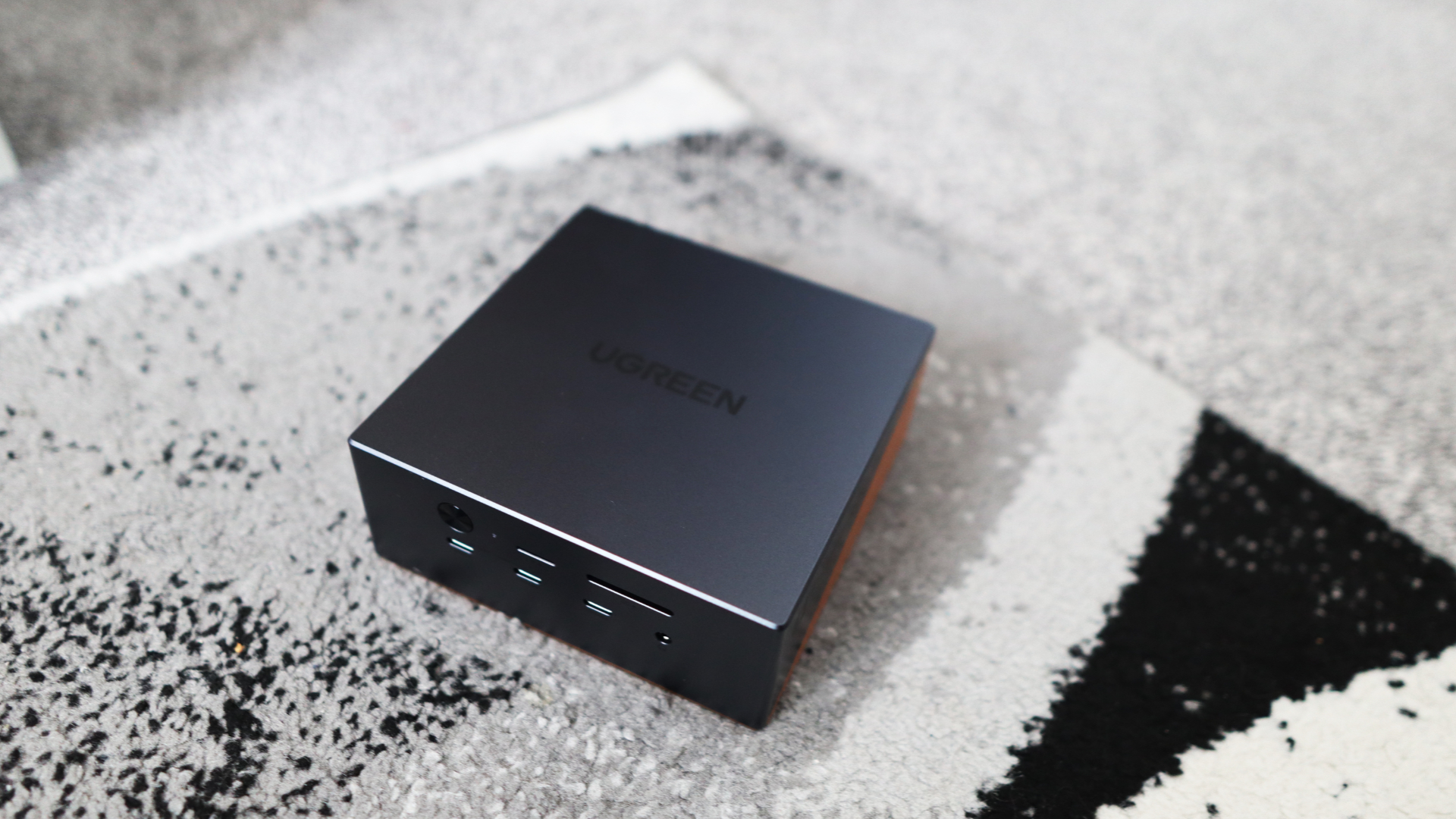
The Maxidok 17-in-1 Thunderbolt 5 Docking Station looks a little different from other laptop docking stations out there, opting for a small cubed shape when a lot of rivals are either hefty vertical towers or long horizontal desk hogs.
Size-wise, it isn’t too dissimilar from the latest Mac Mini, meaning it’s nice and compact. Build quality is strong, with a dark grey aluminium shell that fits the Apple aesthetic and gives this unit some heft; the sides also have copper-coloured accents with venting holes to provide a little bit of flair alongside a Ugreen logo on the top.

The ventilation holes on the sides of the unit are for passive cooling, while a fan inside the dock provides active cooling for more demanding workflows.
The ports on the Maxidok 17-in-1 Thunderbolt 5 Docking Station are accessible, with the front panel housing a power button and indicator LED, along with separate MicroSD and SD card readers.
The SD card readers are potentially faster than a lot of the ones you’ll find in modern ultrabooks, being rated for up to 312Mbps, as they’re both UHS-II-rated, as long as you’re using a card that’ll take advantage of the higher-speed interface.
There is also a headphone jack and a trifecta of USB-C ports, two of which share up to 60W of power for fast charging a laptop, phone, or other devices.

The main attraction is the rear I/O of this Ugreen unit, though, with an upstream Thunderbolt 5 port to your laptop handling the rest of the crowd of ports that provides up to 140W of power to the host device. To add to this, there are two further Thunderbolt 5 ports for hooking up external monitors, fast external SSDs and such, plus a full-size DisplayPort 2.1 for another monitor.
For reference, Thunderbolt 5 doubles data speeds from 40Gbps to bi-directional 80Gbps, and up to 120Gbps in ‘boost mode’ for higher display bandwidth, which technically means it’s capable of up to 8K/60Hz or 4K/240Hz, depending on the laptop you’re using and the ports it comes with.

Moreover, for those connecting high-speed SSDs, Thunderbolt 5 also provides a hefty bandwidth increase with up to 64Gbps PCIe 4.0 available, and transfer speeds of up to 6200MB/s – that means you’ll be able to take advantage of any fast Gen 4 SSD you plug in at nearly full pelt.
You also get 2.5-Gig Ethernet for stable and brisk wired networking, alongside three 10Gbps USB-A ports for legacy devices and peripherals, and separate audio and mic jacks. On the underside is an M.2 slot for adding additional SSD storage, which supports up to 8TB drives, and has a hefty metal heatsink that means the slot is sunk quite far into the unit.

All of this is powered by a hefty 12V DC power brick, which is nearly as large as the Maxidok 17-in-1 Thunderbolt 5 Docking Station itself; nonetheless, as this dock can put out up to 240W of power to compatible devices, it’s certainly required.
Ugreen also bundles a range of region-specific power cables in the box, plus a proper Thunderbolt 5-capable USB-C cable and an M.2 screwdriver for undoing the enclosure on the base of the Maxidok 17-in-1 Thunderbolt 5 Docking Station.
Performance
- Fast charging to my MacBook Pro
- Convenient means of connecting everything I needed to
- Permissions need to be granted before it can work
During my time with the Maxidok 17-in-1 Thunderbolt 5 Docking Station, I hooked it up to my main 16-inch M1 Pro-powered MacBook Pro work laptop and used it in conjunction with a range of devices to best judge its usability.
I used the bundled Thunderbolt 5 USB-C port to connect my MacBook to the docking station, which not only makes it the brains of the operation, but with up to 140W of power delivery, also charges my laptop up briskly to boot.

When hooking up an external display, I was initially greeted with no signal, but it turns out that macOS needed permissions to connect to the dock before anything would work – that’s just a useful troubleshooting tip if you get no display out over either one of the rear USB-C ports or the DisplayPort 2.1 port on the unit.
My 16-inch M1 Pro-powered MacBook Pro unfortunately doesn’t support full-fat Thunderbolt 5 output, and instead has three Thunderbolt 4 USB-C ports, meaning its display out capabilities max out at 6K/60Hz, rather than the 8K/60Hz that Ugreen touts.

Nonetheless, I had no trouble using it at 4K/144Hz with my Philips Evnia 32M2N8900 monitor hooked up to the docking station via the Thunderbolt 4-capable USB-C cable that came with the monitor initially. With a compatible Thunderbolt 5 monitor, though, you may be able to reap the full benefits of 4K/240Hz output over USB-C.
The vast array of ports also allowed this Maxidok 17-in-1 Thunderbolt 5 Docking Station to become the central hub of desktop connectivity, and it was soon easy to try and fill the ports up with an SD card from my camera, a wired mechanical keyboard, wired networking and a spare SSD on the underside to conveniently add storage to the 512GB internal capacity of my MacBook when I needed to.

This dock is designed primarily for more intensive power users than me, and I still had ports I could have used when I thought I’d connected all my devices. It goes to prove the power of an apparent 17-in-1 docking station, and what you can really do with it.
Should you buy it?
You want lots of ports in a compact frame
This Maxidok 17-in-1 Thunderbolt 5 Docking Station impresses with its immense functionality and speed in a chassis that’s much more compact than rival choices.
You don’t need so many ports
If you don’t strictly require the 17-in-1 connectivity this laptop provides, then you can get away with a less featured choice that’ll also be a fair amount more affordable.
Final Thoughts
The Ugreen Maxidok 17-in-1 Thunderbolt 5 Docking Station is a very capable and modern docking station that provides a vast array of fast ports in a compact and stylish chassis that can act as a one-stop shop for power users.
The Thunderbolt 5 USB-C ports are fast, alongside brisk USB and SD card slots, though it is quite expensive overall.
How We Test
We test every docking station we review thoroughly over an extended period of time. We use industry-standard tests to compare features properly. We’ll always tell you what we find. We never, ever, accept money to review a product.
Find out more about how we test in our ethics policy.
- Tested for more than a week
- Tested with real world use
FAQs
The Ugreen Maxidok 17-in-1 Thunderbolt 5 Docking Station has 17 total ports with one upstream Thunderbolt 5 port (80Gbps/120Gbps, 140W, two downstream Thunderbolt 5 ports (80Gbps, 15W), two USB-C ports (10Gbps, 60W, one USB-C port (10Gbps, 7.5W, three USB-A ports (10Gbps, 7.5W, one DisplayPort 2.1, Ethernet (2.5Gb), an SSD slot (M.2 NVme up to 8TB), a UHS-II SD card reader (312MBps), a UHS-II microSD card reader (312MBps), a 3.5mm combo audio jack (front), a 3.5mm In audio jack (back), a 3.5mm Out audio jack (back) and uses a 240W power supply.
Full Specs
| Ugreen Maxidok 17-in-1 Thunderbolt 5 Docking Station Review | |
|---|---|
| UK RRP | £419.99 |
| USA RRP | $499 |
| Manufacturer | Ugreen |
| Size (Dimensions) | 133 x 133 x 53 MM |
| Weight | 870 G |
| Release Date | 2026 |
| First Reviewed Date | 13/04/2026 |
| Resolution | x |
| Ports | One upstream Thunderbolt 5 port (80Gbps/120Gbps, 140W) Two downstream Thunderbolt 5 ports (80Gbps, 15W) Two USB-C ports (10Gbps, 60W) One USB-C port (10Gbps, 7.5W) Three USB-A ports (10Gbps, 7.5W) One DisplayPort 2.1 Ethernet (2.5Gb) SSD slot (M.2 NVme up to 8TB) UHS-II SD card reader (312MBps) UHS-II microSD card reader (312MBps) 3.5mm combo audio jack (front) 3.5mm In audio jack (back) 3.5mm Out audio jack (back) 240W power supply |
| Connectivity | 2.5-gig Ethernet |
| Touch Screen | No |
| Convertible? | No |