Verdict
A great compact tablet for students that doesn’t skimp on performance and includes a brilliant stylus in the box? The Lenovo Yoga Tab has a lot to like.
-
Great, compact size
-
Good performance for the price
-
Stylus included
-
Just three years of updates
-
Bloatware
Key Features
-

Review Price:
£479
-
Stylus included:
Bundled with the Lenovo Tab Pen Pro
-
Quad-speaker setup:
Two tweeters and two woofers
-
3.2K resolution:
11.1-inch IPS LCD
Introduction
Tempted by the iPad Air’s set of features, but would rather spend a little less at the checkout? The Lenovo Yoga Tab might be the alternative you’ve been waiting for.
I have to hand it to Lenovo, there aren’t too many companies out there that offer quite the same degree of variety in the world of tablets compared to the likes of Apple and Samsung, but the brand has absolutely no shortage of options to the point where practically every type of budget is catered for.
Sitting below the premium-level Lenovo Yoga Tab Plus, the standard Lenovo Yoga Tab is still a fairly feature-packed tablet, but thanks to a starting price of £479/$549.99, it’s more affordable than crucial options like the iPad Air M4 and the Samsung Galaxy Tab S10 FE.
Of course, even with a head start on price, the question remains as to whether or not Lenovo can do enough with the Yoga Tab to lure potential adopters.
Despite having reviewed countless tablets from other brands, this is the first Lenovo tablet I’ve ever had the pleasure of testing, and I’ll gladly admit that I should have been paying more attention to the company’s output sooner.
Design
- Very compact build
- Only 6.2mm thick
- Just two colourways available
Being unfamiliar with Lenovo’s design language when it comes to the company’s tablets, I wasn’t too sure what to expect, but I found myself pleasantly surprised from the very first moment that I held the Yoga Tab. This is a slick tablet that brilliantly tows the line of having a decently sized display (11.1 inches) but without ever feeling cumbersome, making it a solid option for some entertainment on the go.

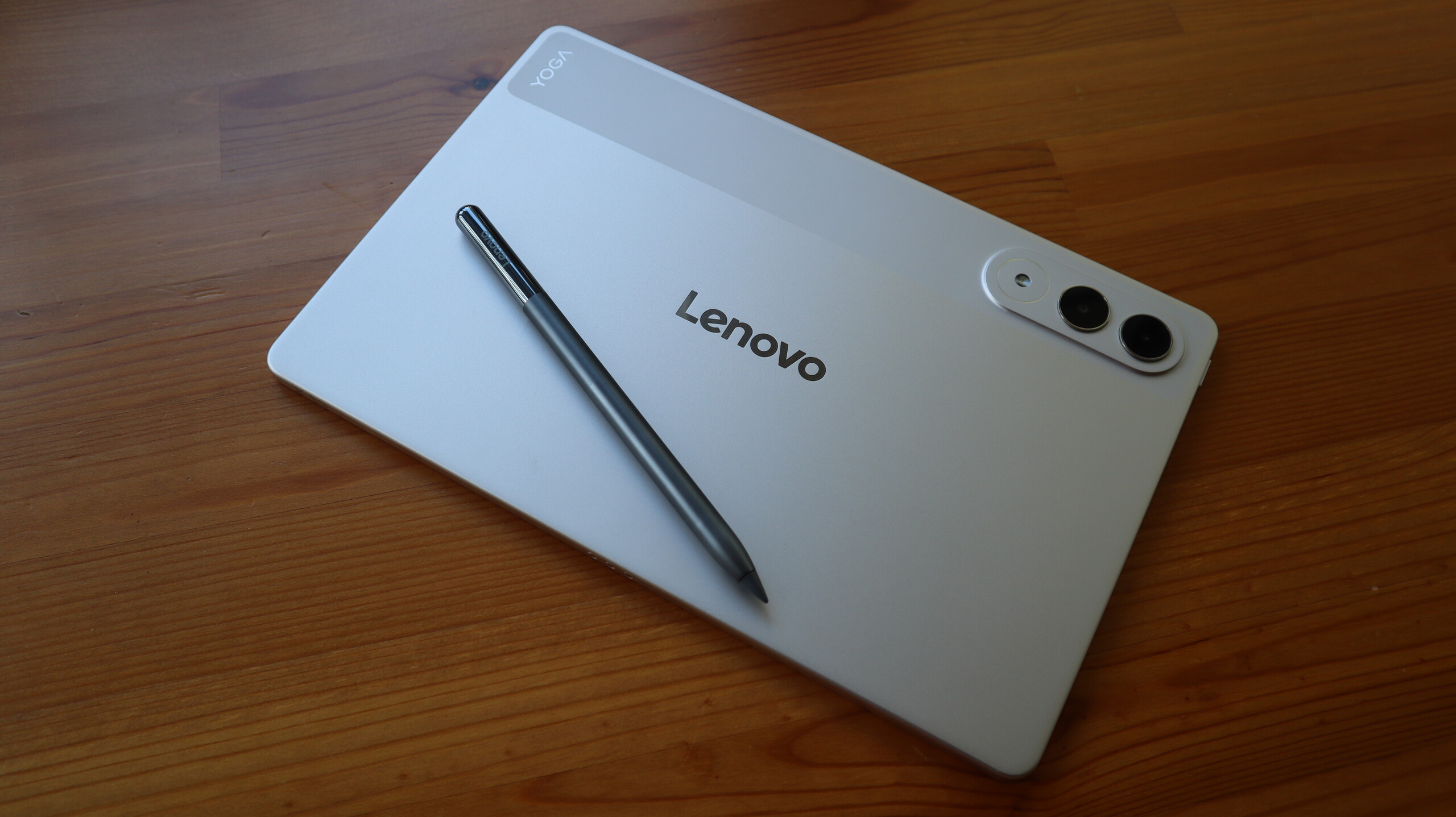
At just 6.2mm thick and with a starting weight of only 458g, the Lenovo Yoga Tab, from a pure design perspective, is exactly what I want from a tablet most of the time. Having recently used the excellent OnePlus Pad Go 2, as much as I loved its larger frame for a bit of productivity when working from home, it’s a little too large to be my go-to tablet if I’m travelling and would rather have something compact that can more easily fit into my carry-on luggage, which is exactly what the Yoga Tab can do.
Even though I’ve been using the device without a case for the duration of this review, because the tablet itself is so slim, I don’t think that bringing a case into the mix will diminish its portability in any meaningful way.
However, one feature that I wish the Yoga Tab had pinched from more affordable Lenovo Idea Tabs is a helpful kickstand for easy viewing. I’ve had to constantly prop the Yoga Tab against several objects, but because the backing doesn’t provide a tangible grip, this has often led to me saving the tablet from sliding away at the last second.
There are two colourways available, Seashell and Luna Grey, the former of which I’ve had in for testing. Both models have a semi-professional look about them, so if they are brought into a meeting they won’t look out of place, but I do wish that they had a bit more of a personality to them. Even the iPad Air M4, despite being a more premium tablet, comes with a hint of colour.
For the sake of consistency, however, I’d recommend picking up the Luna Grey option as it’s colour matched with the included Lenovo Tab Pen Pro, creating a better look overall.

Screen
- 11.1-inch IPS LCD panel
- 3.2K resolution
- 144Hz refresh rate
As I’ve said before, an 11.1-inch panel is the sweet spot as it’s big enough to provide a far more immersive viewing experience than my smartphone, but it’s not too large as to feel cumbersome in the hand, which can be an issue with larger tablets like the 13-inch iPads and the Samsung Galaxy Tab S11 Ultra.
In terms of the display itself, it packs a 3.2K resolution which helps to keep everything looking crisp, whether that’s on the homescreen or when scrolling through the likes of Netflix and Disney Plus for your next watch. It’s also IPS LCD, so no OLED here, although that isn’t too surprising, as you typically have to spend a bit more in order to enjoy self-lighting pixels on a tablet.
Still, the colours look great, and when diving into my go-to stream of Avengers: Infinity War, I did find myself getting drawn into the action.
The refresh rate can also top out at 144Hz, which is great news for gamers. It’s shown off in its best light when running through a couple of matches in titles like Call of Duty Mobile, but even when giving Balatro a spin (although the game is far from the most taxing one out there), all of the animations and card twists look buttery smooth on this display.
One thing I would have liked to see is a slightly higher brightness than the current peak of 800 nits. It certainly gets the job done in most scenarios, but I did spot a bit of dimming around the edges of the display when viewing webpages with a white background. If you’re coming up from a much older tablet then this probably won’t be noticeable, but I did find the OnePlus Pad Go 2 to be a better performer in the brightness department.

The Yoga Tab’s display is nice and responsive though, which was great to see when I was rearranging apps to have everything set up in just the right multitasking configuration. This also applies to instances of using the Pen Pro, with minimal delay present to make you feel connected with your writing.
Cameras
- 13MP main camera
- The 2MP macro camera feels like an odd addition
- 13MP front-facing camera
As much as I love tablet computers, their cameras are barely an afterthought in how I use them, and, as ever, I would not recommend choosing a tablet based on the sensors it includes. Still, if you do need to rely on cameras occasionally for scanning a document or jumping into a Zoom call, then you won’t be disappointed with what the Lenovo Yoga Tab has to offer.
On the back, there’s a 13MP wide-angle camera that can take okay pictures if you need a reference point for something, but start zooming into the shots, and you’ll notice that the detail falls apart pretty quickly. As I mentioned before, this camera is far better suited for scanning documents when needed, and I was impressed to see that even on my dimly lit desk, the camera was able to take a decent scan of a document, which could then be tweaked after the fact to distinguish the text a bit better.

What I can’t quite wrap my head around is the inclusion of a secondary 2MP macro camera on the rear. This is exactly the type of useless feature that the Lenovo Yoga Tab could have done without, as it would have been much nicer to see Lenovo’s efforts focused elsewhere, or to have the price be just a tad more affordable.
At the very least, the front-facing 13MP ultra-wide camera does a great job of capturing everything around you, so if you and several other people near you want to hop onto a video call, there’s a good chance that you’ll all appear on the screen without any need for jostling.
Performance
- Solid power from the Snapdragon 8 Gen 3
- Gaming works like a charm
- Tremendous speakers
Powering the Lenovo Yoga Tab is the Snapdragon 8 Gen 3 chipset which, despite being a few years old now, is still capable of fairly impressive performance. After all, this is the same chipset that used to be reserved for flagship phones, including the Samsung Galaxy S24 Ultra.
I did encounter a slight slowdown during the early phase of using the tablet, whilst everything was installing in the background, with the whole thing freezing on me for a few seconds before responding, but beyond that initial period, I have very much enjoyed my time with the Lenovo Yoga Tab.

Because of the relatively compact size of the device, I’ve enjoyed catching up on the latest headlines, scrolling through the BBC News website with ease, as well as constantly jumping back and forth between the likes of Amazon, Currys and John Lewis on the hunt for any tech or gaming deals I can get my hands on.
When I fancied a bit of interactive entertainment, I was able to connect an Xbox controller over Bluetooth and absolutely decimate my way through a round of Call of Duty: Mobile (anyone using touchscreen controls didn’t stand a chance). Everything ran smoothly, and I didn’t pick up on any instances of lag or screen tearing, something which was partially helped by the 144Hz refresh rate.
Multitasking is also handled incredibly well on the Lenovo Yoga Tab, with my typical use case of having Google Docs open next to the Chrome browser proving to be no issue whatsoever. When pushing it a bit further, I was even more impressed in having BBC News open on one side, Balatro playing on another, and a windowed Disney Plus stream in the corner, all without the tablet buckling. If you’re a student who needs a bit of distraction as you revise, this set-up is perfect.
Test Data
| Lenovo Yoga Tab | OnePlus Pad Go 2 | Samsung Galaxy Tab S10 FE Plus | |
|---|---|---|---|
| Geekbench 6 single core | 2220 | 1003 | 1230 |
| Geekbench 6 multi core | 5758 | 3082 | 3545 |
| Geekbench 6 GPU | 13300 | 2602 | – |
| 3D Mark – Wild Life | 4445 | 874 | 1348 |
| 3D Mark – Wild Life Stress Test | 3893 % | 98.8 % | – |
The only area where I saw limitations in the chipset was when playing more demanding 3D titles. To the Yoga Tab’s credit, it handled the exploration sections of Honkai Star Rail rather well, but it was in the game’s battles that I would spot the occasional frame jump. Still, that’s not bad for a tablet of this price, and unless you’re a serious gamer, I don’t think you’re going to hit the performance ceiling of this tablet very often (if at all).

Saving the best for last, what really gave me pause about this tablet is its speakers. I didn’t anticipate anything special from a tablet this compact, but the quad-firing set-up provides one of the best soundscapes I’ve ever come across in a tablet. Getting to run through my usual test streams has been an absolute joy, and there’s a serious amount of weight provided. If you’re on the road and the Lenovo Yoga Tab is your only source of entertainment, then I don’t think you’ll be disappointed.
Software
- Android with the Lenovo ZUI overlay
- An unfortunate amount of bloatware
- Just three major software updates
As far as the user experience goes, the Yoga Tab uses Lenovo ZUI, and although this was my first experience with this specific Android overlay, I will say that I grew to like it over the course of the testing period. The UI isn’t quite as stylish as OnePlus’ Oxygen OS, but everything is clearly labelled which I appreciated.
For example, you can easily dive into a bit of multitasking by tapping on the three dots that sit at the top of an app, wherein you can have apps sit side by side or have several windowed apps around the screen. Unfortunately you can’t do 90/10 multitasking wherein a second app sits largely out of the way on the side of the display, but can be called upon quickly with a single tap, so it’s not quite as robust an experience as what you’ll find with Open Canvas on OnePlus tablets.
Still, Lenovo’s approach to simplicity also carries over to the quick-access controls for the Pen Pro, wherein you can jot down notes, use Google’s Circle to Search or scribble on a screenshot of whatever’s on the display. I’m not typically a fan of using stylus pens on tablets either, but with the way the software is laid out and the Pen’s very satisfying haptic feedback, I found myself picking it up fairly often.

Instead of having Google News pop up when swiping right from the homescreen, you’re greeted with an entertainment hub that’s mostly centred around Google services. By default, the first thing you see is a Google TV dashboard which collates all of your key streaming services, but you can also access your library of Google Play Store games and any purchased Google Play Books.
Personally, I could do without most of those options, but having quick access to Google TV is great, especially as it cuts down on needing to jump from one streaming app to another in search of what you want to watch.
What I didn’t appreciate seeing was a decent amount of bloatware preinstalled on the device. Before I ever started downloading my own apps, the likes of Adobe Express, CapCut and Perplexity were already present, alongside (strangely enough) two separate drawing/painting apps. It’s something I fully expect to see at the budget end of the market, but at £479 the Yoga Tab is much closer to the mid-range sector.
Even with the bloatware at play, what really stands out as a major knock against the Yoga Tab is that it only carries a promise of three OS updates from the time of launch. Usability is extended slightly by four years of security updates, but it’s not great when you consider that Apple and Samsung offer far in excess of that, so if you don’t want to upgrade your tablet in just a few years, then I recommend looking elsewhere.
Battery life
- 8660mAh cell
- 45W charging
- Charges to full in one hour and 28 minutes
If you do plan on using the Lenovo Yoga Tab either as a productivity device or for getting through your studies, you won’t have much to worry about in terms of battery life. There’s a sizeable 8860mAh silicon carbon cell crammed into this tablet, impressive given its slim build, but it’s meant that I haven’t ever really had to worry about topping it up as I’ve gone about my day.

You can get a larger 10200mAh battery by opting for the more expensive Lenovo Yoga Tab Plus, but unless you really plan on spending hours editing high-quality videos in LumaFusion or CapCut, I don’t think you’ll need the extra grunt.
Charging is also set at 45W, which is fair for a tablet of this price. It’s the same charging speed as the more expensive Samsung Galaxy Tab S10 FE, although if battery is your main concern, then you can get 66W charging (and a bigger cell) on the Xiaomi Pad 8 Pro.
When using a 65W charger, which effectively allows the Yoga Tab to reach its 45W capacity, it took only 1 hour and 28 minutes to reach a full charge, which isn’t bad. Getting to the 50% mark only took 43 minutes, so if you’re in a rush, then you can get back enough juice to get you through a few lectures.
Should you buy it?
You need a compact tablet for university
With good speeds, a stylus included and a slim build that’s easy to carry around, the Lenovo Yoga Tab is a great option for students.
You want a tablet for the long haul
With just three years of software updates provided by Lenovo, the Yoga Tab doesn’t offer the same type of futureproofing as you’ll find with Samsung devices.
Final Thoughts
As someone who spent most of their undergraduate and postgraduate years preferring to use a tablet rather than a laptop, the Lenovo Yoga Tab is exactly the type of device I would have loved to have during my studies. This isn’t to say that adults won’t enjoy using this tablet, only that I think the Yoga Tab excels best as an all-in-one device for students.
The Snapdragon chipset makes multitasking very easy, and with a stylus included, you can take down handwritten notes in a pinch – perfect for when you’re brainstorming with a study group. When you’re ready to call it a day, it’s the combination of quick access to Google TV and the surprisingly powerful built-in speakers that allow the Yoga Tab to work just as well as an entertainment device.
Above all though, it’s the compact nature of this tablet that makes it feel very inviting to use. The lightweight stature makes it simple enough to carry one-handed, and you’ll barely notice its presence when flung in a backpack.
I do wish that the tablet came with a longer period of software support, and the presence of bloatware does make the experience feel a little less premium than the competition. The iPad Air M4 and the Samsung Galaxy S10 FE Plus remedy both of these issues, but they do cost a bit more than Lenovo’s tablet. Alternatively, if you want a great productivity tablet for less than the OnePlus Pad Go 2 is also worth a look.
If you still haven’t made up your mind then check out our guide to the best tablets.
How We Test
We test every mobile phone we review thoroughly. We use industry-standard tests to compare features properly and we use the phone as our main device over the review period. We’ll always tell you what we find and we never, ever, accept money to review a product.
- Used as a main tablet for over a week
Tested and benchmarked using respected industry tests and real-world data
FAQs
There is a stylus included by default with the Lenovo Yoga Tab, but you’ll have to pay more for a bundle that also includes a keyboard case.
Test Data
| Lenovo Yoga Tab | |
|---|---|
| Geekbench 6 single core | 2220 |
| Geekbench 6 multi core | 5758 |
| Geekbench 6 GPU | 13300 |
| 3DMark Solar Bay | 8083 |
| AI performance | 3622 |
| Time from 0-100% charge | 98 min |
| 30-min recharge (included charger) | 35 % |
| 15-min recharge (included charger) | 18 % |
| 3D Mark – Wild Life | 4445 |
| 3D Mark – Wild Life Stress Test | 3893 % |
Full Specs
| Lenovo Yoga Tab Review | |
|---|---|
| UK RRP | £479 |
| USA RRP | $549.99 |
| Manufacturer | Lenovo |
| Screen Size | 11.1 inches |
| Storage Capacity | 256GB |
| Rear Camera | 13MP wide, 2MP macro |
| Front Camera | 13MP |
| Video Recording | Yes |
| IP rating | Not Disclosed |
| Battery | 8660 mAh |
| Size (Dimensions) | 255.5 x 165.8 x 8.3 INCHES |
| Weight | 458 G |
| Operating System | Android 16 |
| Release Date | 2025 |
| First Reviewed Date | 09/04/2026 |
| Resolution | 3200 x 2000 |
| Refresh Rate | 144 Hz |
| Ports | USB-C |
| Chipset | Snapdragon 8 Gen 3 |
| RAM | 12GB |
| Colours | Luna Grey, Seashell |