Verdict
The Razer Joro is one of the more confusing keyboards I’ve reviewed, offering gaming-centred features in a low-profile body with scissor-actuated keys in an office-type shell. It’s pleasant to use for basic typing tasks thanks to its convenient wireless connectivity, a sensible layout and a solid keypress, but lacks the power and precision of properly mechanical gaming keyboards at its high markup.
-
Solid build quality -
Convenient wireless connectivity -
Snappy typing feel
-
Expensive for a non-mechanical keyboard -
Too flat to comfortably type on for extended periods
Key Features
-
Low profile scissor actuated keys
The Joro isn’t mechanical, instead opting for scissor-actuated keys commonly found in laptops and office keyboards. -
Tri-device Bluetooth
It can also connect up to three devices over Bluetooth. -
Weeks of battery life
Razer also says the Joro should work for up to 1800 hours in its power saving mode, giving you weeks and weeks of endurance.
Introduction
The Razer Joro is technically the green brand of the peripherals market’s cheapest wireless gaming keyboard.
However, there is another way of looking at the Joro – it’s quite an expensive office keyboard. At least that’s my perspective.
Allow me to explain – this isn’t a mechanical keyboard, instead opting for a scissor-actuated keypress, while its tri-device Bluetooth connectivity speaks to the power user in me. The small, slim form factor is also likely to help its popularity with the on-the-go office crowd, too.
Okay, maybe I’m getting ahead of myself a little, and I should wait until the end of the review to tell you what I really think.
Nonetheless, the £129.99 / $139.99 price that the Joro commands puts it more in the realm of some of my favourite mechanical gaming or office keyboards, such as the Lemokey P1 Pro and Drop CSTM80, rather than the affordability of scissor-actuated office options like the Cherry KW 7100 Mini BT For Mac and Logitech MX Keys Mini for Mac.
I’ve put the Joro through its paces for the last couple of weeks to see how it stacks up.
Design
- Slender, durable frame
- Functional layout with handy dual-etched legends
- Minimal interface
On first glance, the Joro looks remarkably similar to another ultra-low-profile keyboard I’ve tested recently – the obscure Mistel AirOne, although that is wired and mechanical where the Joro is wireless and membrane.
That isn’t a bad thing, though. The aluminium top plate means there’s no flex or creaking, and for such a thin keyboard, the Joro is remarkably well-built. It features a modern and understated look that’s likely to integrate well into chic office environments as well as in the bags of portable gamers, if that’s who Razer is actually targeting with this product.

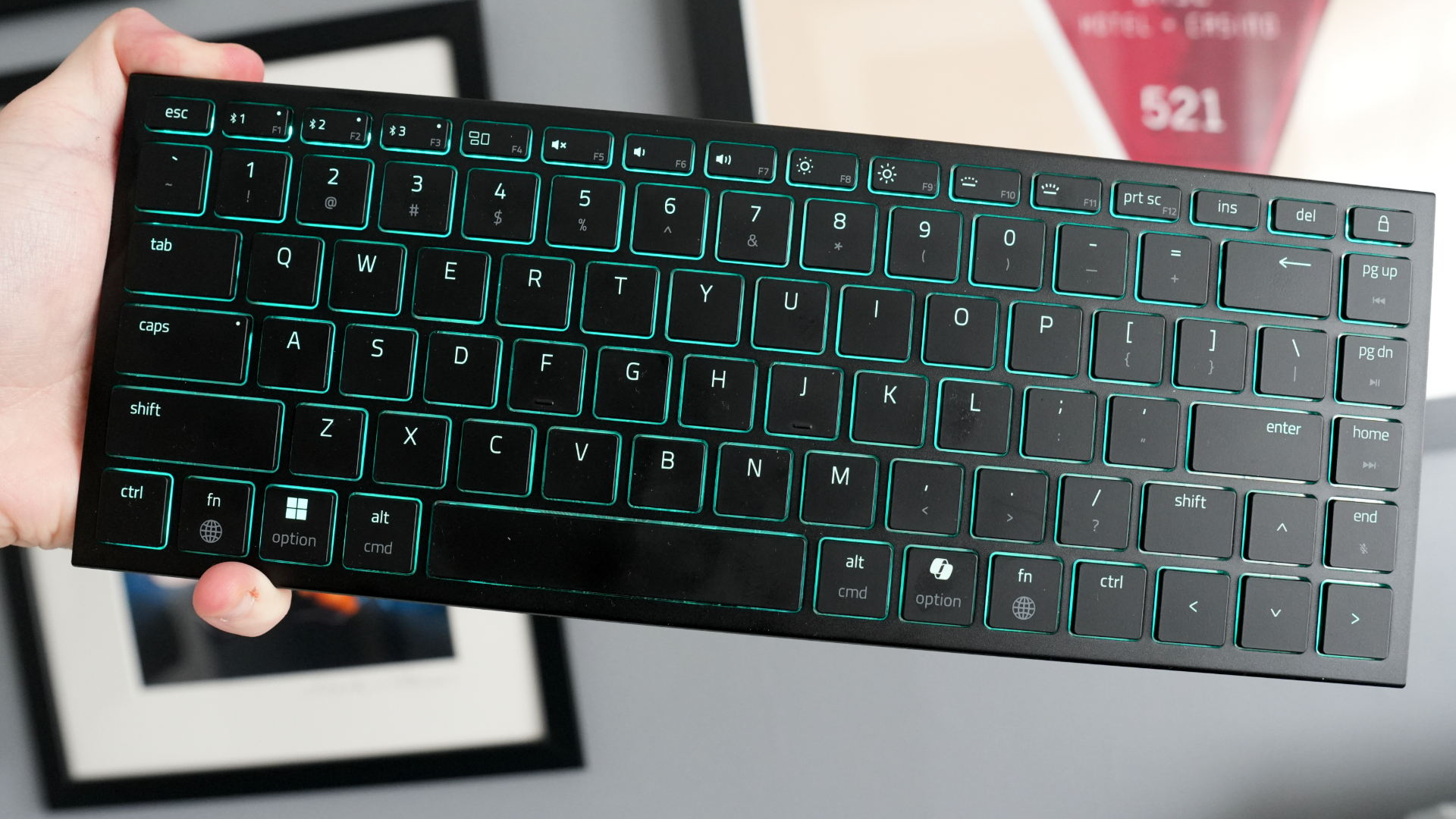
In spite of there being no feet on the underside, there is a slight angle to the Joro’s chassis to make typing more comfortable, while it provides a useful small form factor 75 percent layout that adds extras such as arrow keys, a function row and navigation keys into a dinkier chassis. The function row houses handy things such as pairing channels and RGB backlighting control.
The keycaps here also have a pleasant feel under finger, and have durable laser-etched legends. Key functions are also labelled with Windows and macOS-specific commands, which is a pleasant touch I wish more manufacturers would adopt in their ranges.

The interface around the back is beautifully simple, with only a USB-C port for charging and wired operation, along with an on/off switch. Bluetooth pairing is handled with F1-F3 on the keyboard itself instead.
Performance
- Scissor-actuated keys are fine for typing, but not so much for gaming
- Convenient Bluetooth connectivity
- Excellent battery life
It’s in the performance section where I’ll expand on my thesis of the Joro being an expensive wireless office keyboard as opposed to a contextually cheaper gaming one in Razer’s range.
The key reason for this is the distinct omission of mechanical switches under finger. While there are ultra-low-profile mechanical switches available, such as those found in Cherry’s excellent KW X ULP that provide a lovely positive and tactile feel, they aren’t in that many keyboards at the moment.

Instead, Razer has opted for scissor-actuated keys that feel similar to those you’ll find in a high-quality laptop with a pleasant and positive feel – it’s actually the keyboard that’s in the new Razer Blade 16 (2025) in a separate chassis – although one that lacks the precision and tactility of a properly mechanical keyboard.
It’s a pleasant typing feel, and one I had no trouble with over the few weeks I’ve had the Joro on my desk, with a snappy, short travel that makes work a breeze. The fact that the keyboard is as flat as it is without any retractable feet on the underside is a bit of a pain, though, as it can make typing a bit fatiguing after time.

I’m less enthusiastic about recommending the Joro for gaming, though. That lack of precision that you get with a mechanical switch is a little jarring to move away from and as much as it’s a short travel, I found the scissor-actuated keys to lack a certain responsiveness against low-profile mechanical ones found on the Asus ROG Falchion RX Low Profile, for instance.
However, Razer has been optimistic enough to include gaming-centric features such as full NKRO and anti-ghosting to ensure you press down as many keys as you need with them all registering, and to prevent mispresses.
Bluetooth connectivity and pairing are nice and simple, similar to other keyboards. Hold the button down for the respective channel until the Joro appears in the pairing menu of your host device, and it’ll connect in a matter of seconds. With those dedicated buttons, switching between using it on my Windows gaming PC and my MacBook for work is a breeze.

When it comes to battery life, Razer rates the Joro to last for up to 1800 hours in its power-saving mode, although isn’t more specific than that. In my experience, I’ve only had to charge it a couple of times to top up the pre-existing charge that came in the keyboard when I took it out of the box; I don’t usually tend to leave devices to completely deplete their charge level, but your mileage may vary. You’ll also know when the Joro needs charging, as the RGB lighting flashes red constantly.
Software and Lighting
- Easy customisation in Synapse 4
- Bright RGB lighting
When plugged in, the Joro is compatible with Razer’s Synapse 4 software, much like the DeathAdder V4 Pro mouse. It’s a slicker and lighter suite than its predecessor, making it a lot easier and less frustrating for you.
With it, you can remap keys, configure the RGB lighting, and customise things on up to five profiles while also taking advantage of gaming-centric features such as Razer’s Snap Tap – in essence, their version of the last-key prioritisation or SOCD tech that other manufacturers have added to their gaming keyboards for unnaturally quick side-to-side movement. This has seen Valve wield the ban hammer in Counter-Strike 2’s online modes, so use at your own risk.
The RGB lighting here is nice and vibrant, and some of the sharpest I’ve seen on an office-grade keyboard, if you want it, in typical Razer fashion. The backlighting level is also controllable on the Joro’s function row, which is neat.
Should you buy it?
You really want a portable Razer keyboard
The Joro ticks the box if you like Razer’s feature set and build quality in a portable form factor, but don’t mind sacrificing proper mechanical switches and low-latency wireless connectivity.
You want a mechanical choice
A similar price to the Joro nets you mechanical choices for either general use or for gaming in full-size or low-profile form factors. If you want something mechanical, the Joro won’t fit the bill.
Final Thoughts
The Razer Joro is one of the more confusing keyboards I’ve reviewed, offering gaming-centred features in a low-profile body with scissor-actuated keys in an office-type shell. It’s pleasant to use for basic typing tasks thanks to its convenient wireless connectivity, a sensible layout and a solid keypress, but lacks the power and precision of properly mechanical gaming keyboards at its high markup.
The likes of the Lemokey P1 Pro and Asus ROG Falchion RX Low Profile are only very slightly up the price ladder, but are better suited to their respective disciplines of acting as proper enthusiast-grade wireless mechanical keyboard and a snappy low-profile gaming option.
I think you have to really want the Joro for it to be worth your while – for more options, check out our list of the best gaming keyboards.
How We Test
We use every keyboard we test for at least a week. During that time, we’ll check it for ease of use and put it through its paces by playing a variety of different genres, including FPS, strategy and MOBAs.
We also check each keyboard’s software to see how easy it is to customise and set up.
- Spent at least a week testing
- Tested the performance on a variety of games
- Compared the build quality with similarly priced keyboards
FAQs
No, the Razer Joro isn’t mechanical, and instead uses a scissor-actuated membrane mechanism; it’s the same keyboard you’ll find in the new Razer Blade laptops.
Full Specs
| Razer Joro Review | |
|---|---|
| UK RRP | £129.99 |
| USA RRP | $139.99 |
| Manufacturer | Razer |
| Size (Dimensions) | 114.8 x 298 x 16.6 MM |
| Weight | 360 G |
| Release Date | 2025 |
| Ports | USB-C for charging |
| Connectivity | Bluetooth, USB-C wired |
| Switch Type | Membrane |
| Number of Macro Keys | 0 |
| Battery Length | 1801 hrs |