Verdict
The HP Omnibook X Flip 14 is a capable 2-in-1 device with solid power and excellent battery life in a premium-feeling chassis that also has a solid set of ports. The letdown with this laptop is its screen, especially with subpar colour accuracy, which makes it somewhat hard to recommend for creative purposes.
-
Premium chassis with strong port selection -
Good power for the price -
Excellent battery life
-
Meagre IPS screen -
Rivals are more powerful and have OLED screens
Key Features
-
Intel Core Ultra 5 226V processor
The Omnibook X Flip 14 utilises one of Intel’s mid-range Lunar Lake chips that still packs a surprising punch for the price. -
14-inch 1920×1200 IPS touchscreen
This laptop also has a compact touchscreen display that’s reasonable for creative loads. -
All day battery life
This HP laptop is also able to last for a couple of days on a charge, meaning it’s got excellent endurance.
Introduction
The HP Omnibook X Flip 14 aims to bring a more premium 2-in-1 experience to the masses.
It’s one of the most affordable laptops of its spec and type, priced at £1030 (although discounted to £599 at the time of writing)/$999.99, and comes with an eight-core Intel Core Ultra 5 226V processor, plus 16GB of RAM and 512GB of SSD storage. It also comes with a touch-enabled 14-inch 1920×1200 IPS 60Hz panel, plus a decent 56Whr battery.
For the price, that’s some solid specs on paper for a creative-driven laptop with ample power and endurance, especially as more dazzling options with OLED screens can cost a lot more, such as the Lenovo Yoga 9i 2-in-1 Gen 10 Aura Edition and larger-screened Samsung Galaxy Book5 Pro 360.
I’ve been putting this HP option through its paces for the last couple of weeks to see if it’s one of the best laptops out there.
Design and Keyboard
- Premium feeling chassis
- Good port selection
- Lattice keyboard and slick trackpad
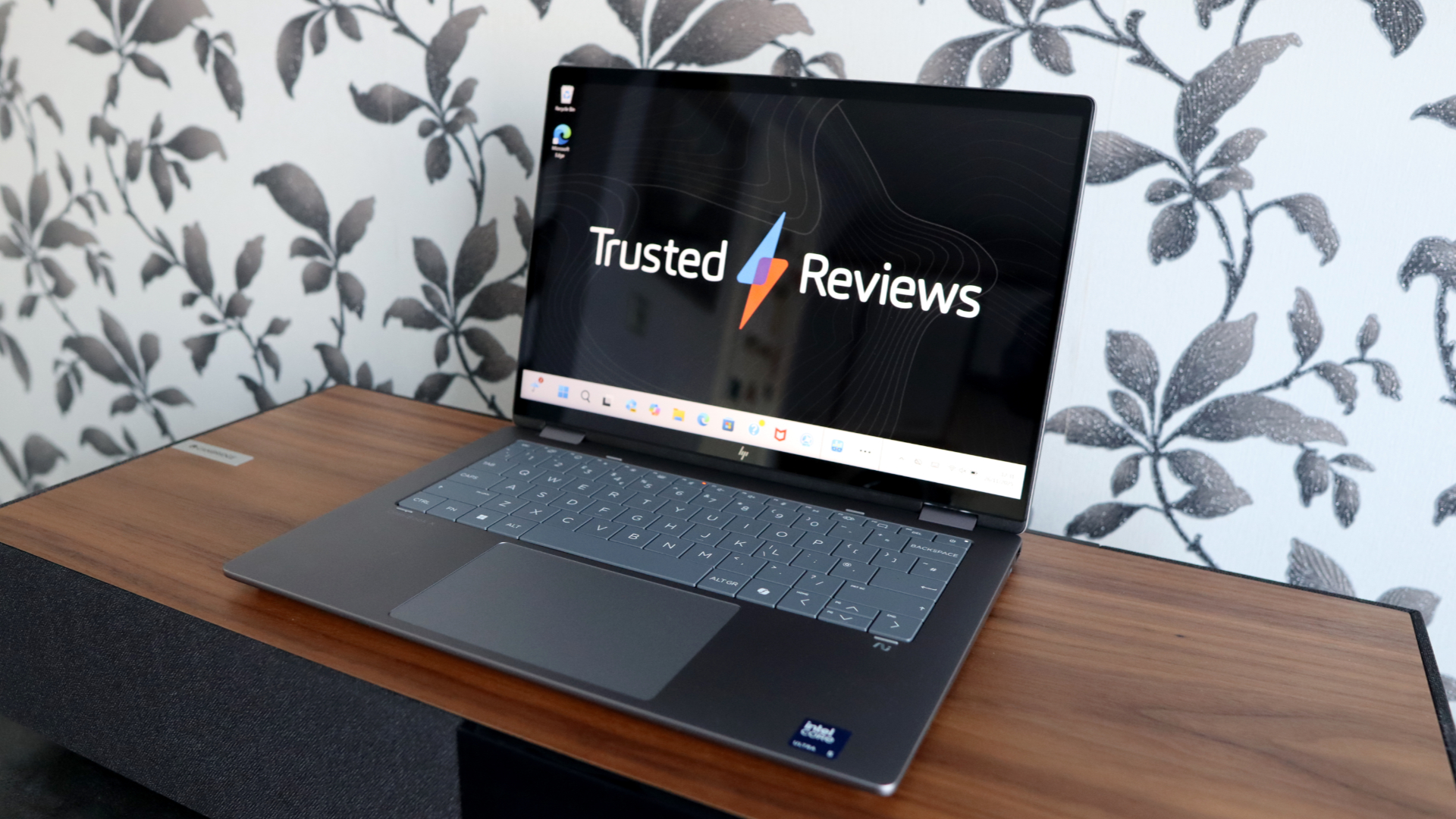
The Omnibook X Flip 14 carries a premium feel with an all-metal chassis that provides it with a little bit of heft for a more compact machine, and a reassuring feel in-hand. There isn’t any real flex to the chassis, and I’m a fan of its more minimalistic style, including a redesigned HP logo.
Tipping the scales at 1.4kg means it is a little on the heavier side for a 14-inch laptop, but it doesn’t make this HP laptop feel unwieldy in hand. It also has a compact footprint and doesn’t take up too much space in a bag when travelling, especially at just 15mm thick.

Unlike some of HP’s other Omnibook releases, this particular option doesn’t skimp out on its ports, coming with a rounded selection. The left side is home to two USB-C ports, an HDMI and a USB-A port, with a further USB-A and a headphone jack on the right side.
Opening up the lid of the Omnibook X Flip 14 reveals a compact keyboard layout in a similar vein to some of Dell’s recent options, following the trend of the zero-lattice keyboard style found on the Dell XPS 13 (2024) and Dell 16 Premium models. It takes some getting used to from a more normal chiclet-style layout, but results in a brisk and tactile keypress that I quite enjoyed using.

As for the trackpad, that’s quite decent in size, providing my fingers with a good amount of real estate for navigation. It’s slick and smooth to use, and not something I had any issues with during testing.
Display and Sound
- Bright IPS screen with decent dynamic range
- Washed out colours
- Meagre speakers
With the Omnibook X Flip 14, HP has opted for a 14-inch 1920×1200 60Hz IPS panel that’s just okay in most respects. Given the more affordable price of this laptop, it provides a fine resolution and panel type, although a higher refresh rate for slicker motion would have been nice to have.
Its 433.5 nits of peak SDR brightness gives displayed images some punch, while the 1930:1 contrast ratio is solid for dynamic range with that brightness in mind. An out-of-the-box black level of 0.14 provides decent depth, too.

Where this screen falls down is with its poor colour accuracy, with just 65% sRGB coverage and 49% of both the DCI-P3 and Adobe RGB spaces. This leads colours to look quite washed out, and means this screen isn’t anywhere near good enough for colour-sensitive design work you may want to use a 2-in-1 laptop for.
The Omnibook X Flip 14’s speakers also aren’t something to write home about. They provide decent volume, but sound quite thin, lacking any real form of depth. It’s mostly mids, with not much in the way of bass.
Performance
- Solid performance from the Core Ultra 5 processor
- Potent integrated graphics for the price
- Meagre capacity, but faster SSD
For this more affordable Omnibook, HP hasn’t opted for the usual Core Ultra 7 256V or 258V Intel Lunar Lake chip that seems to be in a lot of other laptops; the sample I have features the Core Ultra 5 226V processor. It’s still an eight-core and eight-thread chip, as with its bigger brothers, although it has a lower clock speed and less in the way of cache.
With this in mind, its benchmark scores in the likes of Geekbench 6 and Cinebench R23 aren’t too far behind laptops with the Core Ultra 7 chips, taking a small hit in single and multi-core performance. It’s still a rather zippy laptop with its eight cores and threads, and it had no trouble with the benchmark tests that were thrown at it.

In addition, it utilises Intel’s Arc 130V integrated graphics, which provided a good score in the 3DMark Time Spy test, proving this laptop’s good viability for graphically intensive workloads, be it creative-driven tasks such as photo or video editing, and even some light gaming.
My sample also came specced with a more basic 16GB of RAM, which is okay for multi-tasking, and a 512GB SSD. We are seeing laptops in and around this price offering double the storage. Nonetheless, the SSD inside the Omnibook X Flip 14 is a brisk one, with measured read and write speeds of 7020.47 MB/s and 5916.21 MB/s, respectively.
Software
- Reasonably clean Windows 11 install
- Some HP-specific apps
- Enough power to be a Copilot+ PC
The Omnibook X Flip 14 comes running Windows 11, and with a range of software pre-installed, including McAfee antivirus, as is typical with some of these ultrabooks.
It also comes with a range of HP-specific software, most notably the HP Support Assistant, which allows you to check on your system’s vitals, such as component usage, battery health and storage utilisation. There is also HP’s AI Companion app, which is pinned to the taskbar on initial setup and provides a means of accessing HP’s AI assistant features, such as writing copy in a specific style or enabling features such as noise reduction and auto framing for conferencing.

This HP laptop also has enough power with its Core Ultra 5 226V processor to meet Microsoft’s minimum requirements for this laptop to be classified as a Copilot+ PC. This means you can access some of Microsoft’s special AI features that have been featured on most of the other recent ultrabook releases, such as the option for AI filters and generative image work in Paint and Photos, and the nifty Windows Studio webcam effects for auto-framing and maintaining eye contact.
Battery Life
- Lasted for 17 hours 59 minutes in the battery test
- Capable of lasting for two working days
With the Omnibook X Flip 14, HP hasn’t bunged the biggest cell inside, kitting it out with a modest 59Whr capacity option. With this in mind, this laptop carries quite a bullish 16 and a half hours of quoted runtime estimate according to HP – that’s certainly possible, although with the other Omnibook laptops I’ve used recently, they didn’t necessarily hit the target.
In running the PCMark 10 battery test with the display at the requisite 150 nits, this laptop actually managed to exceed both my expectations and HP’s own claimed runtime by lasting for 17 hours and 59 minutes. That makes it a real class leader for battery life, and means you’ll get two working days out of it, no trouble at all.
HP bundles a 65W USB-C charger with this laptop, which charged it up rather slowly, taking 55 minutes to get to 50 percent, while a full charge was 110 minutes.
Should you buy it?
You want an affordable 2-in-1
The Omnibook X Flip 14 is surprisingly affordable for the specs on offer, with its fantastic battery life and solid grunt inside.
You want a better display
The 14-inch IPS screen it comes with is just okay, and there are much stronger OLED options out there on key rivals.
Final Thoughts
The HP Omnibook X Flip 14 is a capable 2-in-1 device with solid power and excellent battery life in a premium-feeling chassis that also has a solid set of ports. The letdown with this laptop is its screen, especially with subpar colour accuracy, which makes it somewhat hard to recommend for creative purposes.
The likes of the Lenovo Yoga 9i 2-in-1 Gen 10 Aura Edition and larger-screened Samsung Galaxy Book5 Pro 360 are more powerful by a little bit, but have much stronger OLED screens that are better all round and make those candidates a lot better-suited to creative tasks.
This is a decent laptop otherwise, with strong ports, excellent battery life, and decent performance from its mid-range Intel processor. For more options, check out our list of thebest laptops we’ve tested.
How We Test
Every laptop we review goes through a series of uniform checks designed to gauge key factors, including build quality, performance, screen quality and battery life.
These include formal synthetic benchmarks and scripted tests, plus a series of real-world checks, such as how well it runs popular apps.
- We used as our main laptop for two weeks
- We test the performance via both benchmark tests and real-world use.
- We test the battery with a benchmark test and real-world use.
FAQs
The HP Omnibook X Flip 14 weighs 1.4kg, making it reasonably hefty for a compact laptop.
Test Data
Full Specs
| HP Omnibook X Flip 14 Review | |
|---|---|
| UK RRP | £1030 |
| USA RRP | $999.99 |
| CPU | Intel Core Ultra 5 226V |
| Manufacturer | HP |
| Screen Size | 14 inches |
| Storage Capacity | 512GB |
| Front Camera | 1080p webcam |
| Battery | 59 Whr |
| Battery Hours | 17 59 |
| Size (Dimensions) | 312.93 x 218 x 14.7 MM |
| Weight | 1.4 KG |
| Operating System | Windows 11 |
| Release Date | 2025 |
| First Reviewed Date | 27/11/2025 |
| Resolution | 1920 x 1200 |
| Refresh Rate | 60 Hz |
| Ports | 2x USB-C, 2x USB-A, 1x HDMI, 1x 3.5mm headphone jack |
| GPU | Intel Arc 130V iGPU |
| RAM | 16GB |
| Colours | Silver |
| Display Technology | IPS |
| Screen Technology | IPS |
| Touch Screen | Yes |
| Convertible? | Yes |